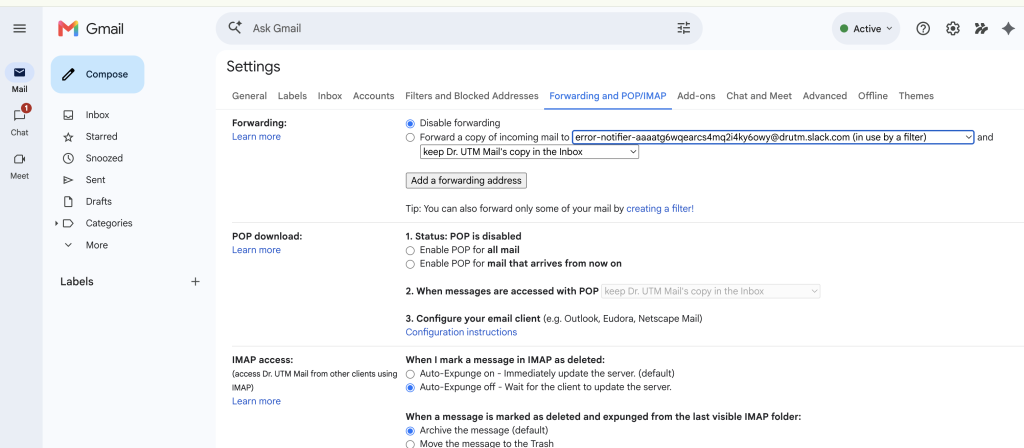
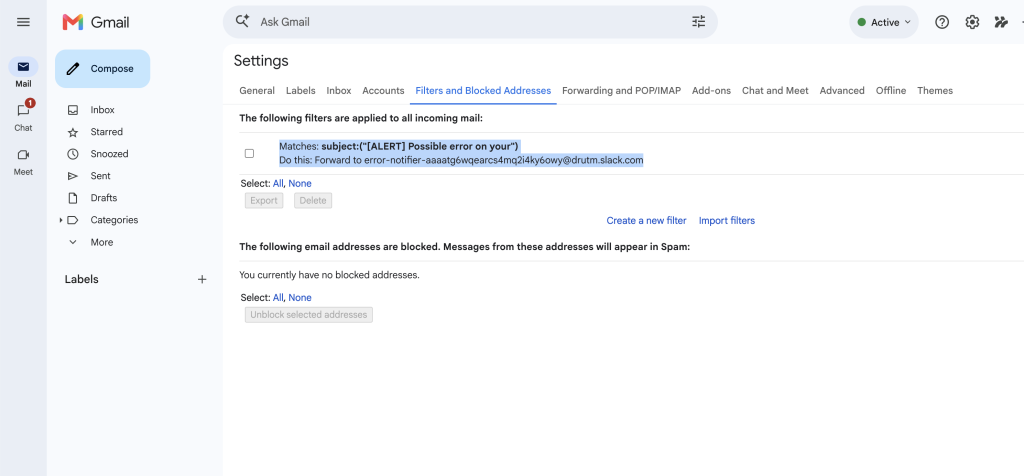
Use these steps to forward Zapier alert emails into our Slack error notification channel.
Forward any email matching this subject rule:
subject:("[ALERT] Possible error on your")
Forward the matching emails to this Slack forwarding address:
error-notifier-aaaatg6wqearcs4mq2i4ky6owy@drutm.slack.com
You only need to set this up in the inbox that receives the Zapier alert emails.
If you are using Gmail or Google Workspace, the forwarding address must be added and approved before Gmail will let you use it in a filter.
[email protected]
After you add the forwarding address, Gmail sends a verification email to our Slack forwarding address.
We will receive that email in Slack and approve the forwarding request. If Gmail gives us a confirmation code instead of a one-click approval link, we will send the code back to you so you can enter it in Gmail.
Once the forwarding address is approved, you can create the filter.
subject:("[ALERT] Possible error on your")If you are using the Gmail popup fields instead of the search box, put this in the Subject field:

[ALERT] Possible error on your[email protected]Important: Do not enable forwarding for all incoming mail. The goal is to forward only the Zapier alert emails that match the subject rule above.
[ALERT] Possible error on your
Take control of your data. Unlock predictable, profitable scaling.
Enterprise-level strategies. Zero fluff.
Get monthly insights on tracking, attribution, and scaling that increase ROAS by 100%.
© Dr. UTM All Rights Reserved 2025. privacy policy terms and conditions